Coupon Code Module
Introduction
Provide customers with a coupon code with discounts or promotional offers on your products or services. Codes can be shown in chat or sent by email, and may be displayed as barcodes and / or QR codes.
Typical Use Cases
Reward your customers with discount promotions or compensate them with coupons in case of problems. Reward them for entering their personal data for the newsletter or play discounts in the raffle.
How to Use the Module
Requirements
An email address is needed. Use an “Email” or “Sign-in” module for this.
Interval
Choose how often the customers can receive a coupon. You can choose between once, daily, weekly or unrestricted often.
Loyalty points
Optionally, set loyalty points as a requirement for coupons. If 0 is entered, loyalty points aren’t needed. To earn loyalty points, use modules like the Loyalty Points Module. If points are required, they will be deducted during the coupon process.
Barcode type
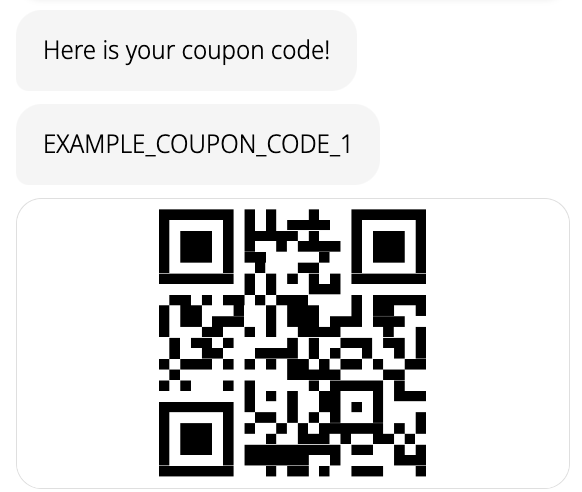
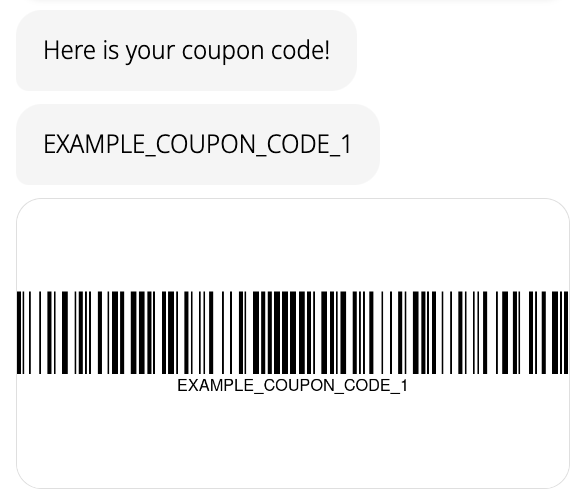
You can select a barcode type like QR code. The coupon will be displayed in this type in email or chat.
- Do not display barcode
- QR code
- Code 128
- Code 39
- Code 93
- EAN 13
- EAN 8
- GS-1 Databar Expanded
- ITF
- PDF 417
Example QR Code
Example Code 128
Coupon code by email
You can send the coupon code via email. Choose the email subject and the message body or add an HTML email template.
In the email you can use the following template variables in addition to the general variables and expressions available in LoyJoy:
${coupon_code}: The coupon code as letters or digits${code_qr_html}: The html code for the coupon code images${message}: The message you entered in the module${footer}: The footer you entered in the module${imprint}: The imprint you entered in the module
Manage coupon
Here you can upload code files for the coupons. It should have one column with all the codes. It does not need a header. For the testing, you can download an example CSV file. To use this example file, you have to download it and upload it afterwards. In the table you have an overview of up to the last 100 issued coupons and which email address is registered for it and on which date. You can export all data with the CSV-export bottom. All data are automatically deleted after 360 days.
Notify, when running out of codes
You can trigger an email when the available codes run out. Enter an email address and number of minimum codes.
Process-Specific Variables
This module generates variables that are accessible throughout the current process. They are only valid for this specific process and may evolve with platform updates. For a detailed list, check the process-specific variables list.